In this tutorial you deploy a complete bedrock tenant on three machines, check that it is healthy and secure, and open its dashboards. It takes about 45 minutes, most of it waiting for the bootstrap.
What you need
- Three machines running Debian 12, each with at least 4 vCPU, 9 GB of RAM and 200 GB of disk. Virtual machines are fine.
- SSH access to each machine with a key, for a user that has passwordless
sudo. - A controller: any Linux machine that can reach the three nodes over SSH. Your laptop works.
- Network access from the nodes to GitHub and the container registries, to download releases and images.
Get the code
On the controller, clone the repository and install the controller’s dependencies:
git clone https://github.com/sassendes/bedrock.git
cd bedrock
sudo ./scripts/ansible_deps.sh
This installs Ansible, the Python Kubernetes client and the kubernetes.core collection.
Describe your machines
Open bootstrap/hosts.ini and replace the placeholders with your machines. The first node creates the cluster and the other two join it.
[server_init]
node1 ansible_host=10.0.0.11 ansible_user=debian ansible_ssh_private_key_file=~/.ssh/bedrock

[server_join]
node2 ansible_host=10.0.0.12 ansible_user=debian ansible_ssh_private_key_file=~/.ssh/bedrock
node3 ansible_host=10.0.0.13 ansible_user=debian ansible_ssh_private_key_file=~/.ssh/bedrock

[rke2_servers:children]
server_init
server_join
Check that Ansible can reach all three:
ansible -i bootstrap/hosts.ini rke2_servers -m ping
Each node should answer with pong.
Deploy
make deploy
The bootstrap prepares the nodes, installs RKE2, then installs the platform layer by layer. Here is what each stage does:
- Nodes. Packages, kernel settings and the audit policy, then RKE2 on the first node and on the other two.
- Admission. Namespaces, priority classes and Kyverno with its policies, so every later pod is checked.
- Storage. Longhorn, then Garage and its buckets.
- Databases. cluster-1, its first backup, then the two replicas restored from that backup.
- Services. Monitoring, logging, alerting, dashboards, Falco and Reloader.
- Policy. The network policies last, followed by a check that every namespace has one.
On a slow connection the first run spends a long time pulling images. If it stops on a timeout, run make deploy again. The bootstrap is safe to run more than once and continues from where the cluster is.
When it finishes, the admin kubeconfig is in ~/.bedrock/kubeconfig on the controller. Point kubectl at it:
export KUBECONFIG=~/.bedrock/kubeconfig
Check that everything runs
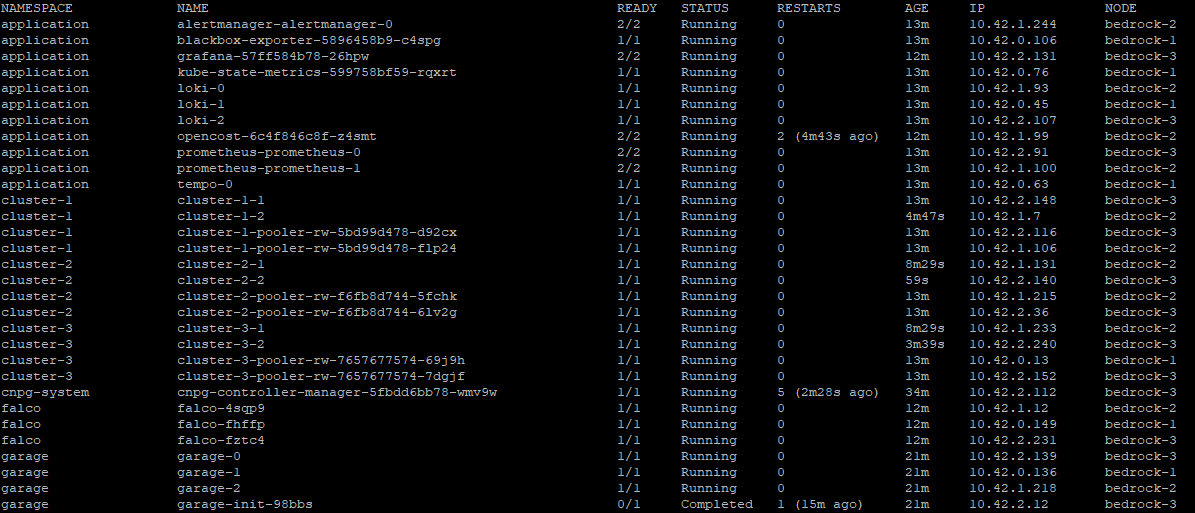
kubectl get pods -A
Every pod should be Running, apart from a few Completed install jobs in kube-system.
Check that it is locked down
List the network policies:
kubectl get cnp,ccnp -A
You should see one CiliumNetworkPolicy per namespace and one cluster-wide policy, cluster-default-deny, all with VALID set to True.
Then run the CIS benchmark on one of the nodes:
curl -sSLO https://github.com/aquasecurity/kube-bench/releases/download/v0.16.0/kube-bench_0.16.0_linux_amd64.tar.gz
tar xzf kube-bench_0.16.0_linux_amd64.tar.gz
./kube-bench run --config-dir ./cfg --benchmark rke2-cis-1.9 --skip 4.3.1
The summary at the end should show 85 checks passed and 1 failed. The failure is check 5.1.6, which is expected; the security model explains why. Check 4.3.1 is skipped because it tests kube-proxy, which this cluster does not run.
Open Grafana
Dashboards are not exposed outside the cluster. Forward Grafana’s port to the controller:
kubectl -n application port-forward svc/grafana 3000:3000
Open http://localhost:3000 and log in with the user and password from secrets/grafana-admin.yaml. The node and database dashboards are already loaded.
What you built
You now have a tenant cluster where:
- every pod starts with all traffic denied and only named flows are open
- images are pinned by digest and checked against an allowlist before they run
- PostgreSQL runs as a primary with synchronous replication, a live replica and a delayed replica, all backed up to encrypted S3
- metrics, logs, traces and audit events are collected and 39 alert rules watch them
Next steps
- Read inside a tenant cluster to see how the parts fit together.
- Turn on an event bus with turn on an event bus.
- When you are done, remove everything with tear down a tenant.